FSharp.Azure.Quantum
Quantum-First F# Library - Solve combinatorial optimization problems using QAOA (Quantum Approximate Optimization Algorithm) with automatic backend selection.


🚀 Quick Start
F# Computation Expressions
open FSharp.Azure.Quantum

// Graph Coloring: Register Allocation
let problem = graphColoring {
    node "R1" ["R2"; "R3"]
    node "R2" ["R1"; "R4"]
    node "R3" ["R1"; "R4"]
    node "R4" ["R2"; "R3"]
    colors ["EAX"; "EBX"; "ECX"; "EDX"]
}

// Solve using quantum optimization (QAOA)
match GraphColoring.solve problem 4 None with
| Ok solution ->
    printfn "Colors used: %d" solution.ColorsUsed
    solution.Assignments
    |> Map.iter (fun node color -> printfn "%s → %s" node color)
| Error msg ->
    printfn "Error: %s" msg
C# Fluent API
using FSharp.Azure.Quantum;
using static FSharp.Azure.Quantum.CSharpBuilders;

// MaxCut: Circuit Partitioning
var vertices = new[] { "A", "B", "C", "D" };
var edges = new[] {
    (source: "A", target: "B", weight: 1.0),
    (source: "B", target: "C", weight: 2.0),
    (source: "C", target: "D", weight: 1.0),
    (source: "D", target: "A", weight: 1.0)
};

var problem = MaxCutProblem(vertices, edges);
var result = MaxCut.solve(problem, null);

if (result.IsOk) {
    var solution = result.ResultValue;
    Console.WriteLine($"Cut Value: {solution.CutValue}");
    Console.WriteLine($"Partition S: {string.Join(", ", solution.PartitionS)}");
    Console.WriteLine($"Partition T: {string.Join(", ", solution.PartitionT)}");
}
📦 Installation
dotnet add package FSharp.Azure.Quantum
✨ Features
🎯 7 Quantum Optimization Builders
Production-ready quantum algorithms for common combinatorial problems:
- Graph Coloring - Register allocation, frequency assignment, scheduling
- MaxCut - Circuit partitioning, community detection, load balancing
- Knapsack - Resource allocation, cargo loading, project selection
- TSP - Route optimization, delivery planning, logistics
- Portfolio - Investment allocation, asset selection, risk management
- Network Flow - Supply chain optimization, distribution planning
- Task Scheduling - Manufacturing workflows, project management, resource allocation with dependencies
🧠 Quantum Machine Learning
Apply quantum computing to machine learning:
- ✅ Variational Quantum Classifier (VQC) - Supervised learning with quantum circuits
- ✅ Quantum Kernel SVM - Support vector machines with quantum feature spaces
- ✅ Feature Maps - ZZFeatureMap, PauliFeatureMap for data encoding
- ✅ Variational Forms - RealAmplitudes, EfficientSU2 ansatz circuits
- ✅ Adam Optimizer - Gradient-based training
- ✅ Model Serialization - Save/load trained models
Examples: examples/QML/ (VQCExample, FeatureMapExample, VariationalFormExample)
📊 Business Problem Builders
High-level APIs for business applications:
- ✅ AutoML - Automated machine learning with quantum kernels
- ✅ Anomaly Detection - Security threat detection, fraud prevention
- ✅ Binary Classification - Fraud detection, spam filtering
- ✅ Predictive Modeling - Customer churn, demand forecasting
- ✅ Similarity Search - Product recommendations, semantic search
Examples: examples/AutoML/, examples/AnomalyDetection/, examples/BinaryClassification/, examples/PredictiveModeling/
🤖 HybridSolver - Optional Smart Routing
Optional optimization layer for variable-sized problems:
- ✅ Analyzes problem size - Routes small problems (< 20 variables) to classical fallback
- ✅ Quantum-first - Uses QAOA on LocalBackend/Cloud for >= 20 variables
- ✅ Cost guards - Budget limits prevent runaway quantum costs
- ✅ Transparent reasoning - Explains routing decision
- ✅ Production-ready - Useful when problem sizes vary significantly
Recommendation: Use direct quantum API (GraphColoring.solve, MaxCut.solve, etc.) for most cases. HybridSolver adds classical fallback optimization for very small problems.
See: Getting Started Guide for detailed examples and decision criteria
🔬 QAOA Implementation
Quantum Approximate Optimization Algorithm with:
- ✅ Automatic QUBO encoding
- ✅ Advanced parameter optimization (COBYLA, SPSA, gradient-free)
- ✅ Configurable circuit depth and shot counts
- ✅ Solution validation and quality metrics
- ✅ Integer variable support
Example: examples/QaoaParameterOptimizationExample.fsx
🖥️ Multiple Execution Backends
🧭 Intent-First Algorithms (Why Some Algorithms Behave Differently Per Backend)
Some algorithms in this library are implemented as intent → plan → execute rather than as a fixed “gate circuit”. This allows the same algorithm to run correctly on:
- gate-native backends (state-vector simulation, common providers), and
- non-gate-native backends (e.g., topological / Majorana-style models).
This is mostly transparent to users: you call the same API, but the backend may choose a different execution strategy. See docs/adr-intent-first-algorithms.md.
- LocalBackend - Fast simulation (≤20 qubits, free)
- IonQBackend - Azure Quantum (29+ qubits simulator, 11 qubits QPU)
- RigettiBackend - Azure Quantum (40+ qubits simulator, 80 qubits QPU)
- AtomComputingBackend - Azure Quantum (100+ qubits, neutral atoms, all-to-all connectivity)
- QuantinuumBackend - Azure Quantum (20-32 qubits, 99.9%+ fidelity, trapped-ion)
- DWaveBackend - D-Wave quantum annealer (2000+ qubits, production hardware)
💻 Cross-Language Support
- F# First - Idiomatic computation expressions and type safety
- C# Friendly - Fluent API extensions with value tuples
- Seamless Interop - Works naturally in both languages
🎯 Problem Types & Examples
Graph Coloring
open FSharp.Azure.Quantum

// Register allocation for compiler optimization
let problem = graphColoring {
    node "Task1" ["Task2"; "Task3"]
    node "Task2" ["Task1"; "Task4"]
    node "Task3" ["Task1"; "Task4"]
    node "Task4" ["Task2"; "Task3"]
    colors ["Slot A"; "Slot B"; "Slot C"]
    objective MinimizeColors
}

match GraphColoring.solve problem 3 None with
| Ok solution ->
    printfn "Valid coloring: %b" solution.IsValid
    printfn "Colors used: %d/%d" solution.ColorsUsed 3
    printfn "Conflicts: %d" solution.ConflictCount
| Error msg -> printfn "Error: %s" msg
MaxCut
let vertices = ["A"; "B"; "C"; "D"]
let edges = [
    ("A", "B", 1.0)
    ("B", "C", 2.0)
    ("C", "D", 1.0)
    ("D", "A", 1.0)
]

let problem = MaxCut.createProblem vertices edges

match MaxCut.solve problem None with
| Ok solution ->
    printfn "Partition S: %A" solution.PartitionS
    printfn "Partition T: %A" solution.PartitionT
    printfn "Cut value: %.2f" solution.CutValue
| Error msg -> printfn "Error: %s" msg
Knapsack
let items = [
    ("laptop", 3.0, 1000.0)   // (id, weight, value)
    ("phone", 0.5, 500.0)
    ("tablet", 1.5, 700.0)
    ("monitor", 2.0, 600.0)
]

let problem = Knapsack.createProblem items 5.0  // capacity = 5.0

match Knapsack.solve problem None with
| Ok solution ->
    printfn "Total value: $%.2f" solution.TotalValue
    printfn "Total weight: %.2f/%.2f" solution.TotalWeight problem.Capacity
    printfn "Items: %A" (solution.SelectedItems |> List.map (fun i -> i.Id))
| Error msg -> printfn "Error: %s" msg
TSP
let cities = [
    ("Seattle", 0.0, 0.0)
    ("Portland", 1.0, 0.5)
    ("San Francisco", 2.0, 1.5)
    ("Los Angeles", 3.0, 3.0)
]

let problem = TSP.createProblem cities

match TSP.solve problem None with
| Ok tour ->
    printfn "Optimal route: %s" (String.concat " → " tour.Cities)
    printfn "Total distance: %.2f" tour.TotalDistance
| Error msg -> printfn "Error: %s" msg
Portfolio
let assets = [
    ("AAPL", 0.12, 0.15, 150.0)  // (symbol, return, risk, price)
    ("GOOGL", 0.10, 0.12, 2800.0)
    ("MSFT", 0.11, 0.14, 350.0)
]

let problem = Portfolio.createProblem assets 10000.0  // budget

match Portfolio.solve problem None with
| Ok allocation ->
    printfn "Portfolio value: $%.2f" allocation.TotalValue
    printfn "Expected return: %.2f%%" (allocation.ExpectedReturn * 100.0)
    printfn "Risk: %.2f" allocation.Risk

    allocation.Allocations
    |> List.iter (fun (symbol, shares, value) ->
        printfn "  %s: %.2f shares ($%.2f)" symbol shares value)
| Error msg -> printfn "Error: %s" msg
Network Flow
let nodes = [
    NetworkFlow.SourceNode("Factory", 100)
    NetworkFlow.IntermediateNode("Warehouse", 80)
    NetworkFlow.SinkNode("Store1", 40)
    NetworkFlow.SinkNode("Store2", 60)
]

let routes = [
    NetworkFlow.Route("Factory", "Warehouse", 5.0)
    NetworkFlow.Route("Warehouse", "Store1", 3.0)
    NetworkFlow.Route("Warehouse", "Store2", 4.0)
]

let problem = { NetworkFlow.Nodes = nodes; Routes = routes }

match NetworkFlow.solve problem None with
| Ok flow ->
    printfn "Total cost: $%.2f" flow.TotalCost
    printfn "Fill rate: %.1f%%" (flow.FillRate * 100.0)
| Error msg -> printfn "Error: %s" msg
Task Scheduling
open FSharp.Azure.Quantum

// Define tasks with dependencies
let taskA = scheduledTask {
    taskId "TaskA"
    duration (hours 2.0)
    priority 10.0
}

let taskB = scheduledTask {
    taskId "TaskB"
    duration (hours 1.5)
    after "TaskA"  // Dependency
    requires "Worker" 2.0
    deadline 180.0
}

let taskC = scheduledTask {
    taskId "TaskC"
    duration (minutes 30.0)
    after "TaskA"
    requires "Machine" 1.0
}

// Define resources
let worker = resource {
    resourceId "Worker"
    capacity 3.0
}

let machine = resource {
    resourceId "Machine"
    capacity 2.0
}

// Build scheduling problem
let problem = scheduling {
    tasks [taskA; taskB; taskC]
    resources [worker; machine]
    objective MinimizeMakespan
    timeHorizon 500.0
}

// Solve with quantum backend for resource constraints
let backend = BackendAbstraction.createLocalBackend()
match solveQuantum backend problem with
| Ok solution ->
    printfn "Makespan: %.2f hours" solution.Makespan
    solution.Schedule
    |> List.iter (fun assignment ->
        printfn "%s: starts %.2f, ends %.2f"
            assignment.TaskId assignment.StartTime assignment.EndTime)
| Error msg -> printfn "Error: %s" msg
🏗️ Architecture
3-Layer Quantum-Only Design:
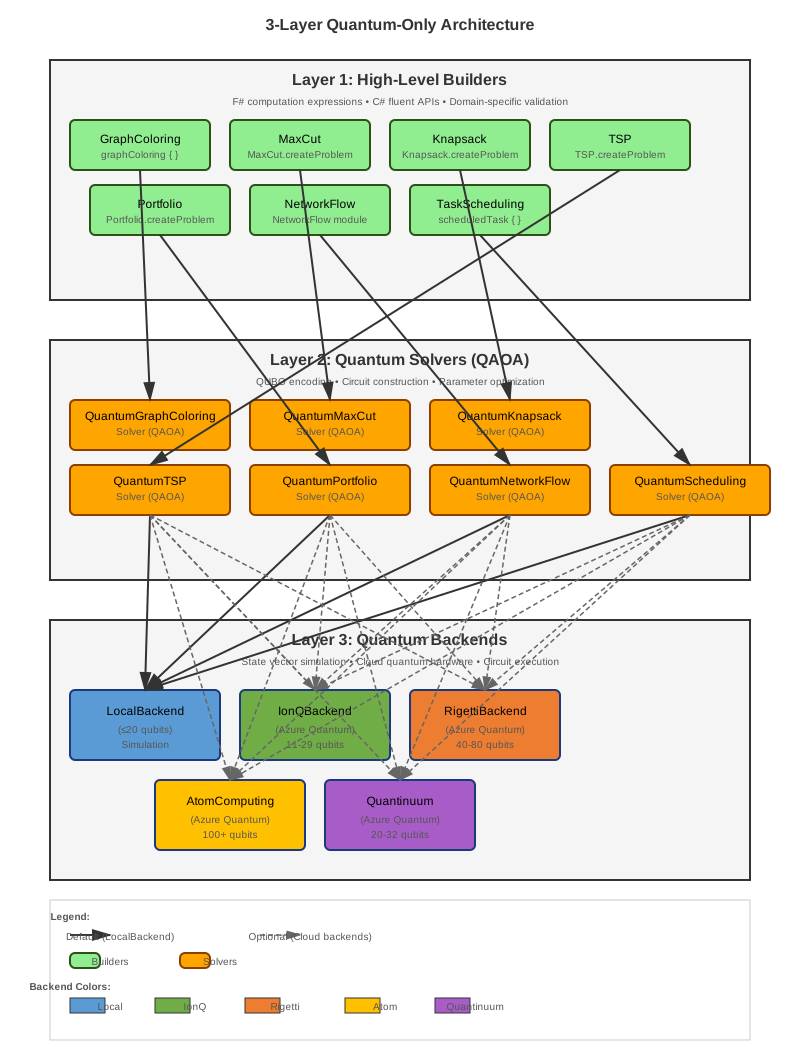
Design Philosophy:
- ✅ Quantum-Only: No classical algorithms (pure quantum optimization library)
- ✅ Clear Layers: No leaky abstractions between layers
- ✅ Type-Safe: F# type system prevents invalid problem specifications
- ✅ Extensible: Easy to add new problem types following existing patterns
📚 Complete Documentation
🚀 Getting Started
- Getting Started Guide - Installation, first steps, and basic examples
- Quantum Computing Introduction - Comprehensive introduction to quantum computing for F# developers (no quantum background needed)
- API Reference - Includes C# interop examples with fluent API
📖 Core Concepts
- API Reference - Complete API documentation for all modules
- Computation Expressions Reference - Complete CE reference table with all custom operations (when IntelliSense fails)
- Architecture Overview - Deep dive into 3-layer quantum-only design
- Backend Switching - Local vs Cloud vs D-Wave quantum execution
- Local Simulation - LocalBackend internals and performance characteristics
🔬 Advanced Topics
- QUBO Encoding Strategies - Problem-to-QUBO transformations for QAOA
- Computation Expression Composition - Advanced CE patterns for loops and composition
- Topological Quantum Computing - Fault-tolerant quantum computing with anyons and braiding
- Quantum Machine Learning - VQC, Quantum Kernels, Feature Maps
- Business Problem Builders - AutoML, Fraud Detection, Anomaly Detection, Predictive Modeling
- Error Mitigation - ZNE, PEC, REM strategies for NISQ hardware
- Advanced Quantum Builders - Tree Search, Constraint Solver, Pattern Matcher, Shor’s Algorithm, Phase Estimation
- D-Wave Integration Guide - Using D-Wave quantum annealers (not yet available)
- FAQ - Frequently asked questions and troubleshooting
🎯 Problem-Specific API Guides
- Graph Coloring API - Register allocation, frequency assignment, scheduling
- Quantum Chemistry API - VQE for molecular ground state energies
- Task Scheduling API - Constraint-based quantum scheduling
💡 Working Code Examples
View source code on GitHub:
Optimization Problems (QAOA)
- DeliveryRouting - TSP with 16-city NYC routing, HybridSolver
- InvestmentPortfolio - Portfolio optimization with constraints (F#)
- InvestmentPortfolio_CSharp - Portfolio optimization (C# version)
- GraphColoring - Graph coloring with QAOA
- MaxCut - Max-Cut problem with QAOA
- Knapsack - 0/1 Knapsack optimization
- SupplyChain - Multi-constraint resource allocation
- JobScheduling - Task scheduling with dependencies
Advanced Quantum Algorithms
- QuantumChemistry - VQE for molecular simulation
- PhaseEstimation - Quantum Phase Estimation (QPE)
- QuantumArithmetic - QFT-based arithmetic operations
- CryptographicAnalysis - Shor’s algorithm demonstrations
Interactive Demonstrations
- Gomoku - Quantum vs Classical AI game (with Hybrid mode)
- Kasino - Quantum gambling game demonstrating superposition (F#)
- Kasino_CSharp - Quantum gambling game (C# version)
🎯 When to Use This Library
✅ Use FSharp.Azure.Quantum When:
- You want to learn quantum optimization algorithms (QAOA)
- You’re building quantum-enabled applications
- You need quantum solutions for combinatorial problems
- You’re researching quantum algorithm performance
- You want to experiment with quantum computing
🔄 Consider Classical Libraries When:
- Problem size < 50 variables (classical is faster)
- You need immediate results (< 1 second)
- Cost is a primary concern
- Deterministic results required
Best Practice:
- Use direct quantum API (
GraphColoring.solve,MaxCut.solve, etc.) for consistent quantum experience across all problem sizes - Use HybridSolver only if you need automatic classical fallback for very small problems (< 20 variables)
- LocalBackend (default) provides free, fast quantum simulation up to 20 qubits - ideal for development, testing, and many production use cases
- Cloud backends (IonQ, Rigetti) for larger problems or real quantum hardware experimentation
🔧 Backend Selection Guide
LocalBackend (Default)
// Automatic: No backend parameter needed
match MaxCut.solve problem None with
| Ok solution -> printfn "Max cut value: %.2f" solution.CutValue
| Error msg -> printfn "Error: %s" msg
Characteristics:
- ✅ Free (local simulation)
- ✅ Fast (milliseconds)
- ✅ Up to 20 qubits
- ✅ Perfect for development and testing
Azure Quantum (Cloud)
open FSharp.Azure.Quantum.Backends.AzureQuantumWorkspace

// Create workspace
let workspace = createDefault "subscription-id" "resource-group" "workspace-name" "eastus"

// IonQ Backend (trapped-ion)
let backend_ionq = BackendAbstraction.createFromWorkspace workspace "ionq.simulator"

// Rigetti Backend (superconducting)
let backend_rigetti = BackendAbstraction.createFromWorkspace workspace "rigetti.sim.qvm"

// Atom Computing Backend (neutral atoms, 100+ qubits, all-to-all connectivity)
let backend_atom = BackendAbstraction.createFromWorkspace workspace "atom-computing.sim"

// Quantinuum Backend (trapped-ion, highest fidelity)
let backend_quantinuum = BackendAbstraction.createFromWorkspace workspace "quantinuum.sim.h1-1sc"

// Pass to solver
match MaxCut.solve problem (Some backend_atom) with
| Ok solution -> printfn "Max cut value: %.2f" solution.CutValue
| Error msg -> printfn "Error: %s" msg
Backend Characteristics:
| Backend | Qubits | Technology | Best For |
|---|---|---|---|
| IonQ | 29+ (sim), 11 (QPU) | Trapped-ion | General gate-based algorithms |
| Rigetti | 40+ (sim), 80 (QPU) | Superconducting | Fast gate operations |
| Atom Computing | 100+ (sim/QPU) | Neutral atoms | Large-scale problems, all-to-all connectivity |
| Quantinuum | 20-32 (sim/QPU) | Trapped-ion | High-precision (99.9%+ fidelity) |
Cost & Performance:
- ⚡ Scalable (11-100+ qubits depending on backend)
- ⚡ Real quantum hardware available
- 💰 Paid service (~$10-100 per run, varies by provider)
- ⏱️ Slower (job queue, 10-60 seconds)
🤝 Contributing
Contributions welcome! See GitHub Repository for contribution guidelines.
Areas we’d love help with:
- New problem builders (SAT, Job Shop Scheduling, Vehicle Routing)
- QAOA warm-start strategies
- Alternative quantum algorithms (VQE, QASM)
- Additional cloud backend support (AWS Braket, IBM Quantum)
- Performance optimizations
🔗 Links
📊 Performance Guidelines
| Problem Type | LocalBackend | Cloud Required |
|---|---|---|
| Graph Coloring | ≤20 nodes | 25+ nodes |
| MaxCut | ≤20 vertices | 25+ vertices |
| Knapsack | ≤20 items | 25+ items |
| TSP | ≤8 cities | 10+ cities |
| Portfolio | ≤20 assets | 25+ assets |
| Network Flow | ≤15 nodes | 20+ nodes |
| Task Scheduling | ≤15 tasks | 20+ tasks |
Note: LocalBackend supports up to 20 qubits. Larger problems require cloud backends.
📄 License
This project is licensed under the Unlicense - dedicated to the public domain.
Status: Production Ready - Quantum-only architecture with 7 problem builders
Last Updated: 2025-12-03